
Silk Mobile
Table of Contents (Homepage)
- Overview
- Setting Up
- Getting Started
- How To
- Connecting Devices And Emulators
- Preparing Applications For Testing
- Managing Applications
- Recording Tests
- Working With Test Commands
- Adding Commands To Your Scripts
- Object Commands
- Click
- ClickCoordinate
- ClickIn
- ClickOffset
- Drag
- ElementGetProperty
- ElementGetTableRowsCount
- ElementListPick
- ElementListSelect
- ElementListVisible
- ElementScrollToTableRow
- ElementSendText
- ElementSetProperty
- ElementSwipe
- ElementSwipeWhileNotFound
- GetAllValues
- GetElementCount
- GetElementCountIn
- GetTextIn
- IsElementBlank
- IsElementFound
- IsFoundIn
- LongClick
- RunNativeAPICall
- SendWhileNotFound
- VerifyElementFound
- VerifyElementNotFound
- VerifyIn
- WaitForElement
- WaitForElementToVanish
- GetCoordinateColor
- DragDrop
- Application Commands
- Device Commands
- Web (Hybrid) Specific Commands
- Utilities Commands
- Monitoring Commands
- Configuration Commands
- ExtractLanguageFiles
- SetDefaultClickDownTime
- SetDefaultTimeOut
- SetDefaultWebView
- SetDragStartDelay
- SetInKeyDelay
- SetKeyToKeyDelay
- SetLanguage
- SetLanguagePropertiesFile
- SetShowImageInReport
- SetShowPassImageInReport
- SetShowReport
- SetSpeed
- SetThrowExceptionOnFail
- SetWebAutoScroll
- StartStepsGroup
- StopStepsGroup
- TextFilter
- Miscellaneous Commands
- Controlling Element Identification Rules
- Editing Test Objects
- Executing Test Scripts
- Report Of Executed Test
- Working From Code Environment
- Continuous Integration
- Layout Verification Tests
- Use Device Vitals Monitors
- Troubleshooting
- Terminology
Android Key Events
If you are writing scripts using a real external device, such as an Android, you can simulate key events using the SendText(Text) command.
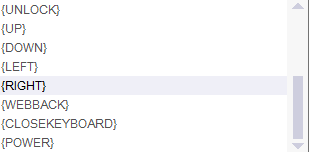
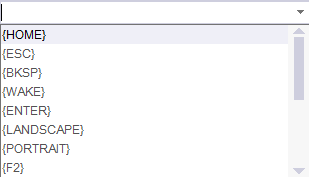
The following keys can be used with the "SendText" command:
-
For deleting text: {BKSP}
-
For submitting a text field: {ENTER}
-
For waking a device (if it is in sleep mode, if the screen is black): {WAKE}
-
For unlocking the device if it is actually locked: {UNLOCK}
-
For Browser Back button : {WEBBACK}
-
-
Toggle orientation:
-
For landscape: {LANDSCAPE}.
-
For Portrait: {PORTRAIT}.
-
-
For opening the menu: {F2}
-
For changing windows ( as in nexus devices - the right button next to home button in the screen ) - {recent_apps}
-
Click on Home: {Home}
-
Click on Back: {ESC}
-
Click on Power key: {POWER}
-
For pasting text: {PASTE}
-
For Android version 4.3 and above:
-
To open Notification Bar: {NOTIFICATION}
-
To open Settings: {SETTINGS}
-